In a recent project, I had to perform dynamic language translation for a Flask web application. Depending on the client’s browser language configuration, the site should display a Translate link which will translate the post content into the user’s language preference. This is based on the following AWS Builder post. I adapted the same idea using Bedrock Foundational Models to perform dynamic translations.
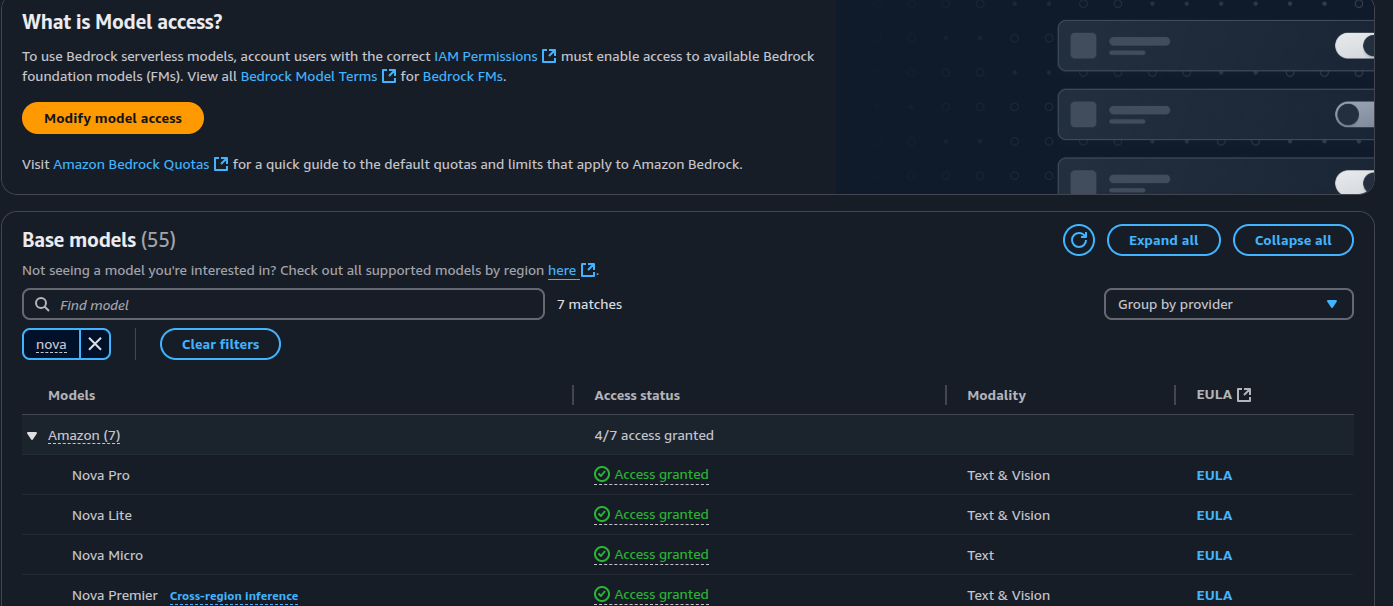
Amazon Bedrock is a platform which hosts foundational models, including 3rd party providers such as Anthropic as well as AWS’s own Nova models. To be able to use these models, you need to create a Model Access request for the models you want to use. At the time of this writing, the models are region specific for inference tasks. For example, to perform inference using Nova, it’s not available in eu-west-2 region. To request access, go to AWS Bedrock > Model Access and select the models you want to use. The screenshot below shows access being granted for Nova models:
Within the flask application, we try to detect the user’s language by reading the request.accept_languages header field and setting it in the application’s global context as g.locale. This global context will be accessed on each request:
import flask
from flask import request
from flask import g

def get_locale():
    return request.accept_languages.best_match(['en', 'es'])

app = Flask(__name__)

@app.before_request
def moment_before_request():
    g.locale = str(get_locale())

...
We need to identity the language each post is written in before we can perform translation. We add an additional field of laguage to the post SQLAlchemy model and using the langdetect library, set this attribute on post creation:
class Post(Database.Model):
    __tablename__ = 'posts'
    id = mapped_column(Integer(), primary_key=True, autoincrement=True)
    message = mapped_column(Text(), nullable=False)
    created = mapped_column(DateTime(timezone=True), default=lambda: datetime.now(timezone.utc))
    language = mapped_column(String(length=5), nullable=True)

...
from langdetect import detect, LangDetectException
@bp.route("/", methods=["GET", "POST"])
@login_required
def home():
form = PostForm()
if form.validate_on_submit():
try:
language = detect(form.message.data)
except LangDetectException:
language = ''
post = Post(
message=form.message.data,
language=language,
author=current_user
)
Database.session.add(post)
Database.session.commit()
...Each post is rendered via a partial which has a custom Translate link that checks if the post language matches the locale set in the global context. If they don’t match, the translate link will be displayed. The jinja template for the post partial is shown below:
{% if post.language and post.language != g.locale %}
    <span id="translation{{ post.id }}">
        <a href="#" class="translate" data-id="post{{ post.id }}" data-target="translation{{ post.id }}" data-source="{{ post.language }}" data-dest="{{ g.locale }}">
            {{ _('Translate') }}
        </a>
    </span>
{% endif %}
We set as data attributes the post id; the target div to write the translation to; the source language which is set to the post’s language attribute; the destination language is set to the locale in the global application context.
The link is invoked via an async javascript function that adds an event handler to all links with the class of translate
      async function translate(event) {
        event.preventDefault();

        sourceElem = event.target.getAttribute("data-id");
        destElem = event.target.getAttribute("data-target");
        sourceLang = event.target.getAttribute("data-source");
        destLang = event.target.getAttribute("data-dest");

        try {
          document.getElementById(destElem).innerHTML =
          '<img src="{{ url_for("static", filename="loading.gif") }}">';

          const response = await fetch('/translate', {
            method: 'POST',
            headers: {'Content-Type': 'application/json; charset=utf-8'},
            body: JSON.stringify({
              text: document.getElementById(sourceElem).innerText,
              source_language: sourceLang,
              dest_language: destLang
            })
          })
          const data = await response.json();
          document.getElementById(destElem).innerText = data.text;
        } catch (e) {
          console.error(e);
        }
      }

      document.querySelectorAll('.translate').forEach( button => {
        button.onclick = function (e) {
          translate(e);
        }
    });
The javascript function calls an endpoint /translate which is a Flask application route that invokes a custom module to perform the translation:
from flask import Blueprint, request
from flask_login import login_required, current_user
from board.translate import translate

@bp.post("/translate")
@login_required
def get_translation():
    data = request.get_json()
    return {
        'text': translate(data['text'], data['source_language'], data['dest_language'])
    }
The translate function takes as parameters the post content; its source and destination language and calls bedrock.invoke_model to perform the translation. I decided to use the Nova micro model for this use case. The prompt was adopted from the AWS Builder post article to perform translation:
You are a professional translator of many languages.
Please carefully translate the following content from {source_lang} to {dest_lang}.
Instructions:
- Maintain the original formatting
- Keep the tone and style consistent
- Do not change the meaning or structure of the content
- Return only the translated text without any additional commentary
- Do not translate any code blocks or inline code
- Ensure proper grammar, spelling, and punctuation
- If the content is already in {dest_lang}, just ignore it and return the content as is

Here is the content to translate:

{text}
The prompt will be provided with the actual post content, and source and destination languages.
Next, we define the inference config for the request. This sets the inference parameters such as temperature. Since this is a translation task, we want the results to reduce hallucinations so we set the temperature to loew value such as 0.1, increase the topP to 0.9 and restrict the maximum number of tokens returned.
The prommpt and the inference config are passed to a request object. This sets the prompt as a user message type with the prompt as the content. This format is used by many foundational models as a way to track user and model responses in a chat / conversational flow. We passed this request object in json to bedrock.invoke_model call.
The full code is shown below:
import os
import json
import boto3


def translate(text, source_lang, dest_lang):
    bedrock_client = boto3.client(
        "bedrock-runtime",
        region_name=os.getenv("AWS_REGION", "us-east-1")
    )

    prompt = f"""
You are a professional translator of many languages.
Please carefully translate the following content from {source_lang} to {dest_lang}.
Instructions:
- Maintain the original formatting
- Keep the tone and style consistent
- Do not change the meaning or structure of the content
- Return only the translated text without any additional commentary
- Do not translate any code blocks or inline code
- Ensure proper grammar, spelling, and punctuation
- If the content is already in {dest_lang}, just ignore it and return the content as is

Here is the content to translate:

{text}
    """

    req = {
        "messages": [
            {
                "role": "user",
                "content": [
                    {
                        "text": prompt
                    }
                ]
            }
        ],
        "inferenceConfig": {
            "temperature": 0.1,
            "topP": 0.9,
            "maxTokens": 10240
        }
    }

    bedrock_response = bedrock_client.invoke_model(
        modelId = "us.amazon.nova-micro-v1:0",
        body=json.dumps(req),
        contentType="application/json"
    )

    resp = json.loads(bedrock_response["body"].read())
    translation = resp["output"]["message"]["content"][0]['text']

    return translation
Below are some screenshots of running the application locally. We created a post in Spanish in order to render the translate link. Clicking on the translate link should translate the post back into English:

