In the original tutorial for securing a FastAPI application, the approach was to create the auth tokens from within the application itself. FastAPI provides built-in OAuth features such as OAuth2PasswordBearer to support password flow OAuth authentication.
There are different types of OAuth flows but the Authorization code grant is mostly used for web applications. It involves a user logging in with his username and password to a backend service in exchange for authentication tokens. These tokens are in the form of JWT ( Json Web Tokens ).
Using AWS Cognito, we can create a user pool to handle and manage user authentication and authorization.
An AWS Cognito user pool is a user directory for web and mobile applications. It provides both authentication and authorization. From the perspective of your application, the Cognito user pool is an OpenID Connect Identity Provider.
To create a User Pool, we navigate to the Cognito page in the console and click on create User Pool. For testing purposes, we only enable the following flows:
- ALLOW_USER_PASSWORD_AUTH
- ALLOW_ADMIN_USER_PASSWORD_AUTH
- ALLOW_REFRESH_TOKEN_AUTH
We also need the following information about the user pool for the API calls later:
- User pool ID ( User pool main page )
- Client ID ( Application client main page )
- Client Secret ( Application client main page )
- AWS Region ( region the user pool created in )
Note that to allow for user signup, we need to enable Self-service signup under the Sign-up option of the user pool, else the Cognito API requests via the SDK will fail with An error occurred (NotAuthorizedException) when calling the SignUp operation: SignUp is not permitted for this user pool
User sign up / registration
We create a custom user router for the user authentication routes. One of the first routes would be for user registration:
class UserSignup(BaseModel):
    username: str = Field(max_length=50)
    email: EmailStr
    password: str


@router.post("/users/signup", tags=["Authentication"])
async def create_users(
    user: UserSignup,
    session: SessionDep,
    cognito: AWSCognito = Depends(get_aws_cognito),
):
    resp = AuthService.user_signup(user, cognito)
    db_user = User(
        username=user.username,
        email=user.email,
        password=get_password_hash(user.password),
    )
    session.add(db_user)
    session.commit()
    session.refresh(db_user)

    return resp
UsersSignup is a pydantic model that accepts and validates user inputs during the signup process. This is passed to the route /users/signup as a dependency. SessionDep is a dependency which yields a SQLModel session client and the AWSCognito is a dependency which is passed to the Cognito service class, which invokes the user create API call via the boto3 SDK.
Once the Cognito signup is successful, we create an instance of the user model using the same UserSignup pydantic model and saves the record into the database. Syncing between the remote cognito user pool and the database will be a subject for future posts.
The AuthService service class wraps the user registration:
class AuthService:
    @staticmethod
    def user_signup(user: UserSignup, cognito: AWSCognito):
        try:
            response = cognito.user_signup(user)
        except ClientError as e:
            if e.response["Error"]["Code"] == "UsernameExistsException":
                raise HTTPException(status_code=409, detail="account with email exists")
            else:
                raise HTTPException(status_code=500, detail="Internal server error")
        else:
            if response["ResponseMetadata"]["HTTPStatusCode"] == 200:
                content = {
                    "message": "User created successfully",
                    "sub": response["UserSub"],
                }
                return JSONResponse(content=content, status_code=201)
AWSCognito is a class that calls the Cognito API. Below shows the user signup function:
class AWSCognito:
    def __init__(self):
        self.client = boto3.client("cognito-idp", region_name=AWS_REGION)

    def user_signup(self, user: UserSignup):
        secret_hash = base64.b64encode(
            hmac.new(
                bytes(AWS_COGNITO_APP_CLIENT_SECRET, "utf-8"),
                bytes(user.username + AWS_COGNITO_APP_CLIENT_ID, "utf-8"),
                digestmod=hashlib.sha256,
            ).digest()
        ).decode()

        response = self.client.sign_up(
            ClientId=AWS_COGNITO_APP_CLIENT_ID,
            SecretHash=secret_hash,
            Username=user.username,
            Password=user.password,
            UserAttributes=[
                {"Name": "name", "Value": user.username},
                {"Name": "email", "Value": user.email},
            ],
        )

        return response
We call the sign_up method of the Cognito client and pass in the user attributes from the API signup route. Next, we also create a secret hash of the username and pass it with the request. The secret hash adds an additional layer of verification that the call originates from the given cognito user pool.
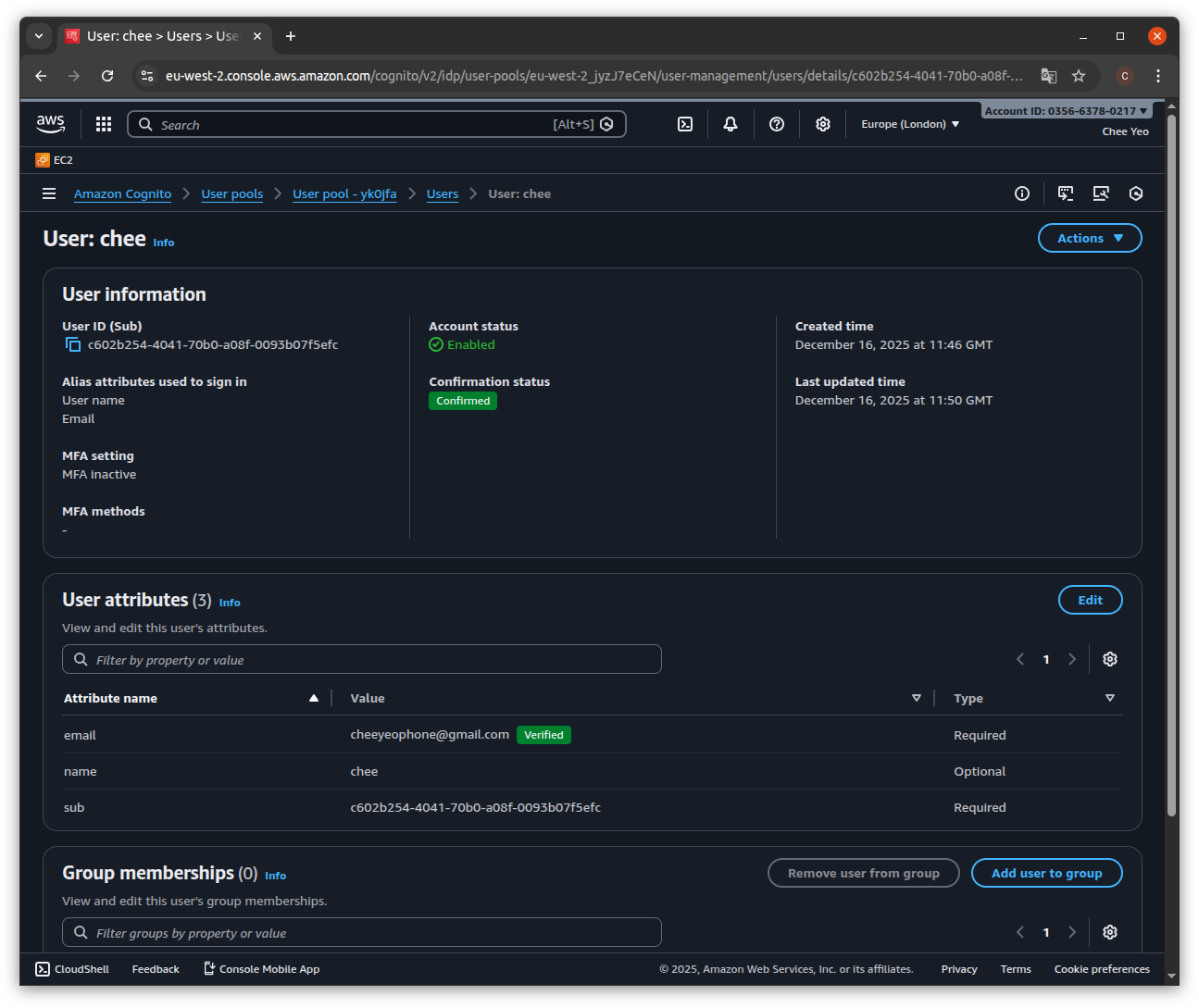
Once successful, we should see the user added under Users in the User pool. Cognito will send a 6 digit confirmation code via the user email. The user would need to call the confirm signup cognito endpoint, passing in the confirmation code to activate his account. Below is a snippet of the function calls:
class UserVerify(BaseModel):
    username: str
    confirmation_code: str


class AWSCognito:
    def __init__(self):
        self.client = boto3.client("cognito-idp", region_name=AWS_REGION)

    def verify_account(self, data: UserVerify):
        secret_hash = base64.b64encode(
            hmac.new(
                bytes(AWS_COGNITO_APP_CLIENT_SECRET, "utf-8"),
                bytes(data.username + AWS_COGNITO_APP_CLIENT_ID, "utf-8"),
                digestmod=hashlib.sha256,
            ).digest()
        ).decode()

        response = self.client.confirm_sign_up(
            ClientId=AWS_COGNITO_APP_CLIENT_ID,
            Username=data.username,
            ConfirmationCode=data.confirmation_code,
            SecretHash=secret_hash,
        )

return response@router.post("/users/verify", tags=["Authentication"])
async def verify(data: UserVerify, cognito: AWSCognito = Depends(get_aws_cognito)):
return AuthService.verify_account(data, cognito)Below is a screenshot of a registered user in Cognito after successful registration and confirmation:
Authentication and authorization
Within FastAPI, we use the OAuth2PasswordBearer flow which exchanges a username and password for a bearer token. Using the default Swagger UI, this option generates an Authorize link at the top left of the UI, which displays a form to get the user credentials. This calls the route "/users/login" which calls the Cognito API InitiateAuth method.
Below is the sample code for setting up the routes and FastAPI Dependencies:
class UserSignin(BaseModel):
    username: str
    password: str


@router.post("/users/login", tags=["Authentication"])
async def login(
    form_data: Annotated[OAuth2PasswordRequestForm, Depends()],
    cognito: AWSCognito = Depends(get_aws_cognito),
) -> Token:
    resp = AuthService.user_signin(
        UserSignin(username=form_data.username, password=form_data.password), cognito
    )
    content = json.loads(resp.body.decode("utf-8"))
    return Token(access_token=content.get("AccessToken"), token_type="bearer")


class AuthService:
    @staticmethod
    def user_signin(user: UserSignin, cognito: AWSCognito):
        try:
            response = cognito.user_signin(user)
        except ClientError as e:
            if e.response["Error"]["Code"] == "UserNotFoundException":
                raise HTTPException(status_code=404, detail="user does not exist")
            elif e.response["Error"]["Code"] == "UserNotConfirmedException":
                raise HTTPException(status_code=403, detail="verify your account")
            elif e.response["Error"]["Code"] == "NotAuthorizedException":
                raise HTTPException(
                    status_code=401, detail="incorrect username or password"
                )
            else:
                raise HTTPException(status_code=500, detail="Internal server error")
        else:
            content = {
                "message": "User signed in successfully",
                "AccessToken": response["AuthenticationResult"]["AccessToken"],
                "RefreshToken": response["AuthenticationResult"]["RefreshToken"],
            }

            return JSONResponse(content, status_code=200)


class AWSCognito:
    def __init__(self):
        self.client = boto3.client("cognito-idp", region_name=AWS_REGION)

        def user_signin(self, data: UserSignin):
            secret_hash = base64.b64encode(
                hmac.new(
                    bytes(AWS_COGNITO_APP_CLIENT_SECRET, "utf-8"),
                    bytes(data.username + AWS_COGNITO_APP_CLIENT_ID, "utf-8"),
                    digestmod=hashlib.sha256,
                ).digest()
            ).decode()

            response = self.client.initiate_auth(
                ClientId=AWS_COGNITO_APP_CLIENT_ID,
                AuthFlow="USER_PASSWORD_AUTH",
                AuthParameters={
                    "USERNAME": data.username,
                    "PASSWORD": data.password,
                    "SECRET_HASH": secret_hash,
                },
            )

        return response
Note that the route takes a dependency of OAuth2PasswordRequestForm which retrieves the username and password from the Swagger UI form mentioned before. This is passed to the UserSignin pydantic model which passes it to the boto3 SDK in cognito.user_signin. THe service returns both the access and refresh tokens as a json response.
If the login is successful, Cognito returns 3 tokens in the format of JWT ( Json Web Tokens ):
- ID token, which contains claims about the user identity such as username and email.
- Access token, which contains claims about the user, user groups and scopes.
- Refresh token, which is used to obtain a new set of ID and access tokens.
The access token is used for API authorization through the use of scopes. This would require setting up a resource server in Cognito which will be shown in a future post.
In terms of authorization, we create a depdency of CurrentActiveUser which uses the previously obtained access token and retrives the username from the payload. We check if the user exists in the database and if so, we return the user record which is set as the current active user in the session. If not, we return a 404 exception:
reusable_oauth2 = OAuth2PasswordBearer(tokenUrl="/users/login")
TokenDep = Annotated[str, Depends(reusable_oauth2)]
CognitoDep = Annotated[AWSCognito, Depends(get_aws_cognito)]

class Token(BaseModel):
    access_token: str
    token_type: str

def get_user(username: str):
    for session in get_session():
        user = session.exec(select(User).where(User.username == username)).first()
        if not user:
            raise HTTPException(status_code=404, detail="User not found")
        return user


class AWSCognito:
    def __init__(self):
        self.client = boto3.client("cognito-idp", region_name=AWS_REGION)

    def decode_token(self, token: str):
        jwks = self.get_jwks()
        unverified_header = jwt.get_unverified_header(token)
        rsa_key = {}

        for key in jwks["keys"]:
            if key["kid"] == unverified_header["kid"]:
                rsa_key = {
                    "kty": key["kty"],
                    "kid": key["kid"],
                    "use": key["use"],
                    "n": key["n"],
                    "e": key["e"],
                }

        if not rsa_key:
            raise Exception("Unable to find appropriate key")

        try:
            payload = jwt.decode(
                token,
                rsa_key,
                algorithms=["RS256"],
                audience=AWS_COGNITO_APP_CLIENT_ID,
                options={"verify_aud": True},
            )

            return payload
        except JWTError:
            raise JWTError


async def get_current_user_cognito(cognito: CognitoDep, token: TokenDep):
    credentials_exception = HTTPException(
        status_code=status.HTTP_401_UNAUTHORIZED,
        detail="Could not validate credentials",
        headers={"WWW-Authenticate": "Bearer"},
    )

    try:
        payload = cognito.decode_token(token)
        username = payload.get("username")
        if username is None:
            raise credentials_exception
    except InvalidTokenError:
        raise credentials_exception

    user = get_user(username)
    if user is None:
        raise credentials_exception

    return user


CurrentUser = Annotated[User, Depends(get_current_user_cognito)]

async def get_current_active_user(current_user: CurrentUser):
    if current_user.disabled:
        raise HTTPException(status_code=400, detail="Inactive user")

    return current_user


CurrentActiveUser = Annotated[User, Depends(get_current_active_user)]
The OAuth dependency TokenDep is passed to the get_current_user_cognito function as a dependency. The CurrentUser constant is defined as a dependency of get_current_user_cognito using typing annotations, which declares it returns a type of User which is defined as a database model. This is returned via the get_user function. Whenever we use CurrentActiveUser in a route path, it will call TokenDep and if authorized, passes the Token model to get_current_user_cognito. We perform the following checks on the token:
- Verifying the JWT as shown in the guide AWS Cognito Verifying JWT
- Checks that the username in the token belongs to an actual API user
The example below shows the above dependency being used in a route that returns information about the current user:
@router.get("/users/me", response_model=UserPublic, tags=["Authentication"])
async def read_users_me(current_user: CurrentActiveUser):
    return current_user
Below is a screenshot of the same route in Swagger UI:
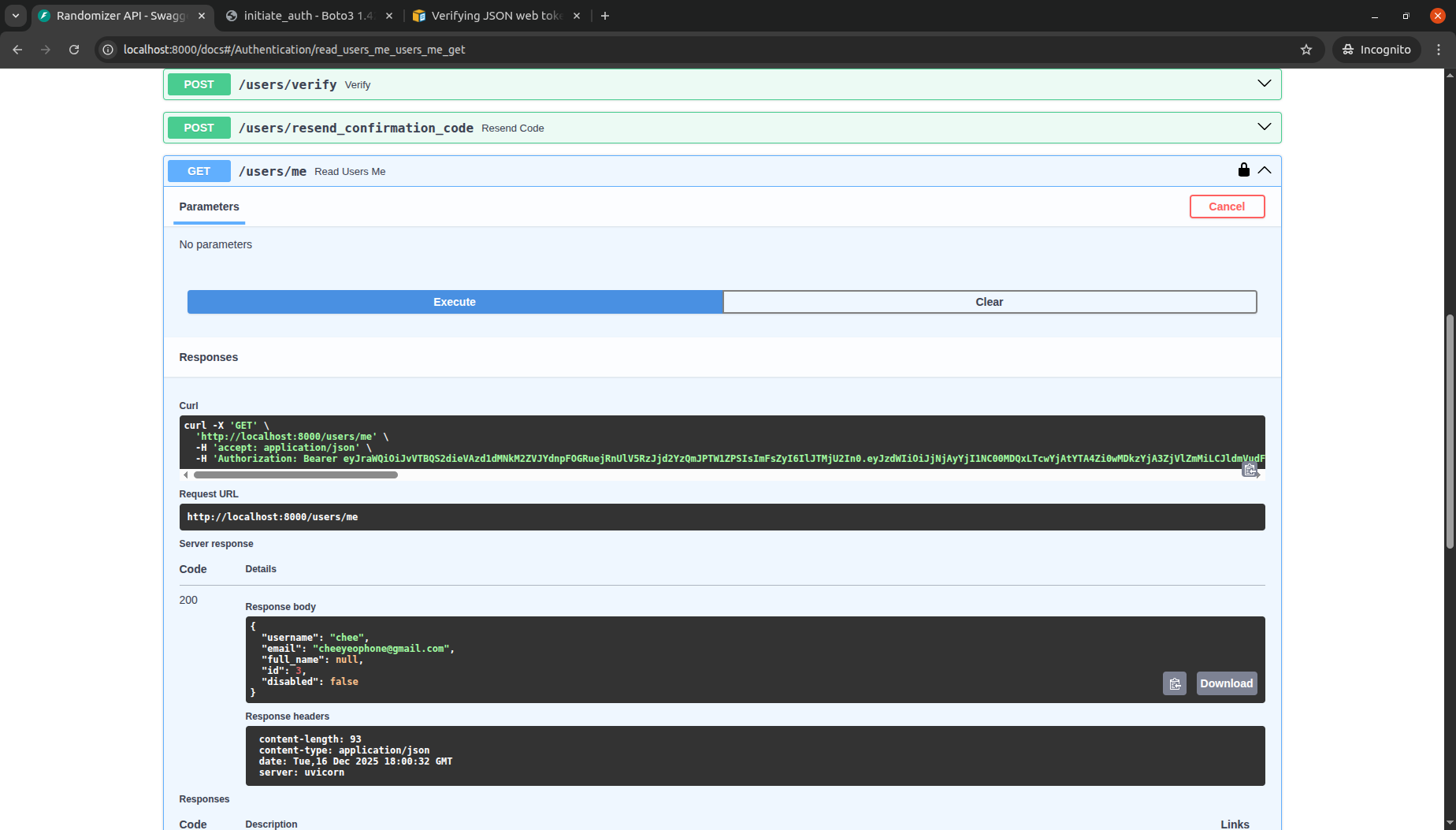
The code can be reviewed at the following Github Repository
Follow up
There are still other subjects which have not been explored in this post:
- How to cache Cognito tokens locally to avoid calling API
- How to keep database user in sync with the tokens
- How to define scopes to further refine API access for each user