In a previous post, I showed an example of integrating FastAPI with Cognito as an OAuth provider. Another advanced usage is to introduce scopes into the OAuth flow to refine the authorization of the API.
Scopes are an additional field within the access token that can be used to restrict access to API resources. The default scope returned by Cognito is aws.cognito.signin.user.admin me which allows the user to administer their own Cognito profile such as updating their username. Custom scopes are created by the developer to provide authorization to certain parts of the API, meaning certain FastAPI paths could have a OAuth2 scope declared as a security dependency via the Security function.
For example, the route below defines a Security dependeny with a custom me scope:
async def get_current_active_user(current_user: Annotated[User, Security(get_current_user_cognito, scopes=["me"])]):
    if current_user.disabled:
        raise HTTPException(status_code=400, detail="Inactive user")

    return current_user
Scopes are inherited in a tree-like hierarchy as explained in FastAPI OAuth Scopes Dependency. For example, using the previous function, if we were to create another Security dependency using it as an input, then the new security dependency will inherit the scopes as well as its own scopes:
async def get_current_active_user(current_user: Annotated[User, Security(get_current_user_cognito, scopes=["me"])]):
    if current_user.disabled:
        raise HTTPException(status_code=400, detail="Inactive user")

    return current_user

CurrentActiveUserRandoms = Annotated[User, Security(get_current_active_user, scopes=["randoms"])]

CurrentActiveUser = Annotated[User, Depends(get_current_active_user)]

@router.get("/users/me", response_model=UserPublic, tags=["Authentication"])
async def read_users_me(current_user: CurrentActiveUser):
    return current_user


@router.get(
    "/randoms/", response_model=list[RandomItemPublic], tags=["Random Items Management"]
)
async def read_randoms(
    session: SessionDep,
    user: CurrentActiveUserRandoms,
    offset: int = 0,
    limit: Annotated[int, Query(le=100)] = 100,
):
    randoms = session.exec(
        select(RandomItem)
        .where(RandomItem.user_id == user.id)
        .offset(offset)
        .limit(limit)
    ).all()
    return randoms
The path /users/me declared a dependency of CurrentActiveUser, which has a dependency on CurrentActiveUser, which has a dependency on get_current_active_user, which has a Security scope of me.
The path /randoms has a dependecy on CurrentActiveUserRandoms which has a dependency on get_current_active_user which has declared a scope of randoms but it has also inherited the security scope of me from get_current_active_user, which makes it a combined scope of [me, randoms]
To add custom scopes to an access token issued by Cognito, the recommended approach is to create a Resource server to define the custom scopes and a custom domain with TLS enabled. The application would need to call the Token Endpoint via the custom domain at <custom domain>/oauth/endpoint to retrieve the access token with the custom scopes. Usage of the Cognito API via cognito-idp boto3 client will not allow retrieval of the custom scopes.
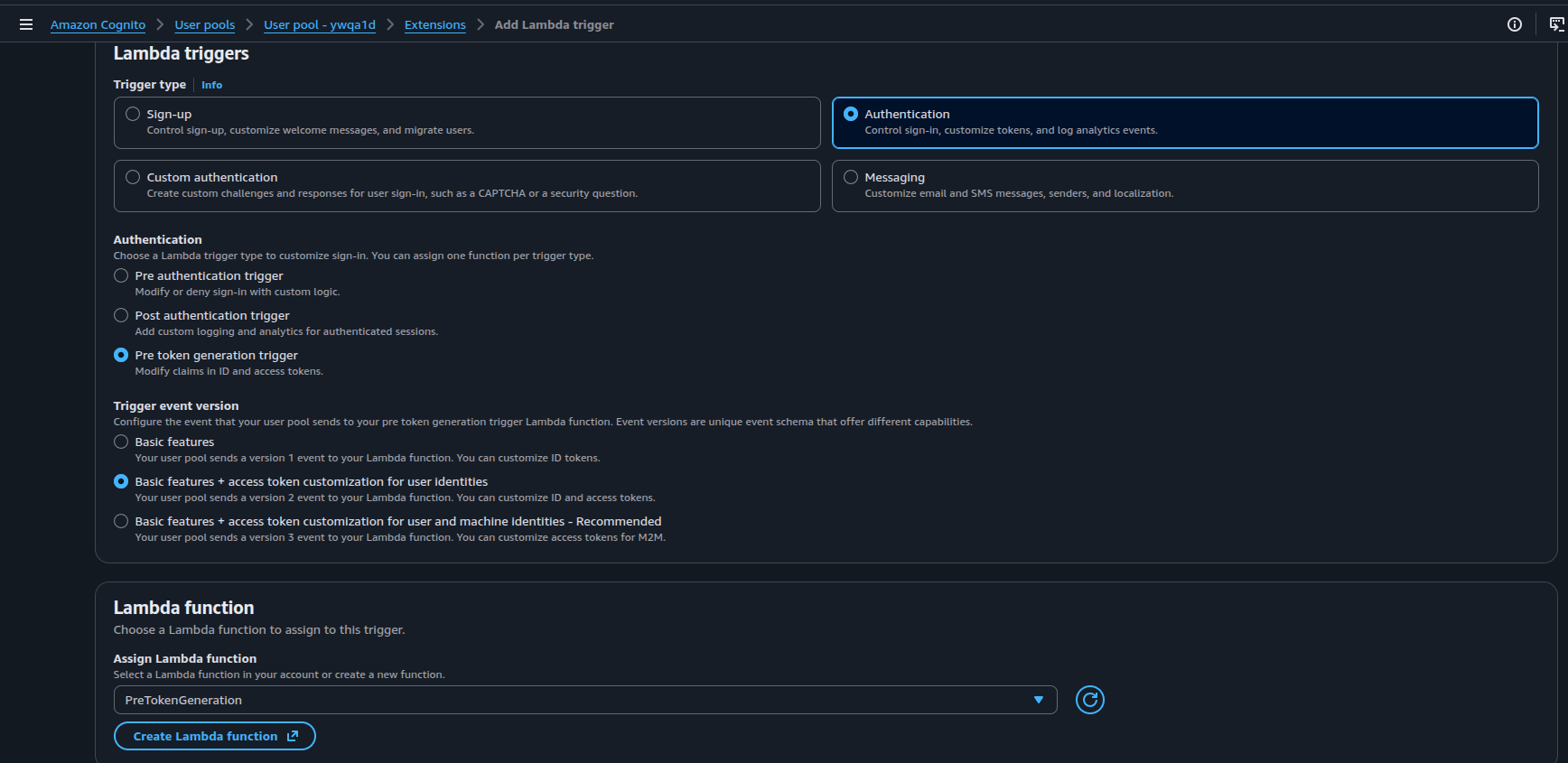
Another approach is to create a Lambda trigger which would allow you to add the custom scopes into the access token before its returned from Cognito. This lambda function is known as a PreToken generation Lambda.
The lambda code for our PreToken generation lambda is as follows:
def lambda_handler(event, context):
    event['response'] = {
        "claimsAndScopeOverrideDetails": {
            "idTokenGeneration": {},
            "accessTokenGeneration": {
                "scopesToAdd": ["me", "randoms"]
            }
        }
    }

    return event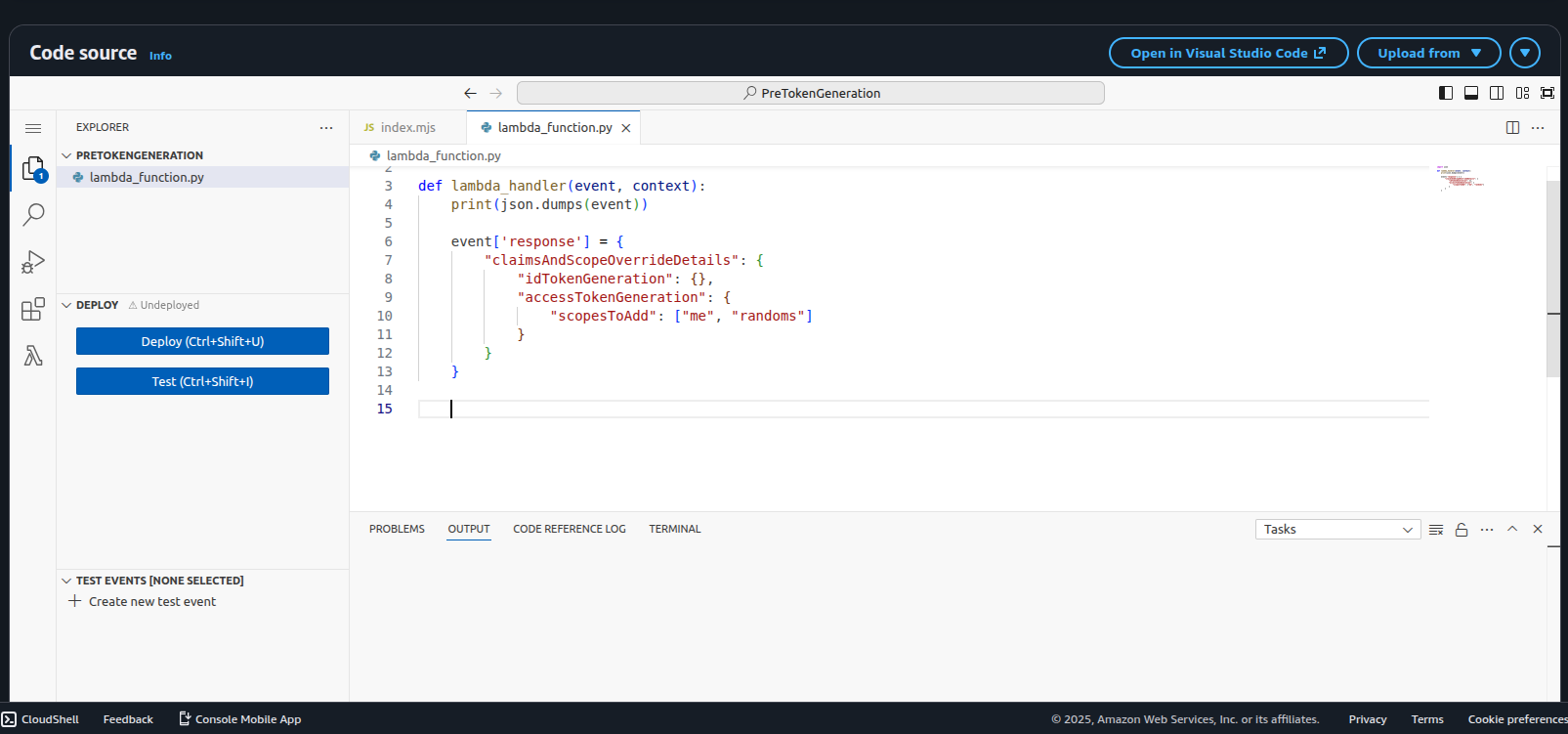
According to Lambda Triggers Pre token generation, we add to the event object an additional key of response with a claimsAndScopeOverrideDetails object where we define the additional scopes. For this simple example, we are defining them manually but in real world usage, we probably want to parse the event object to retrieve details on the cognito user and use that information to retrieve or obtain the required scopes dynamically.
Next, we link the lambda trigger to the user pool by going into Extensions > Lambda Triggers and selecting the Lambda function:
The OAuth2PasswordBearer flow has been updated to also include the list of acceptable scopes for the API:
reusable_oauth2 = OAuth2PasswordBearer(tokenUrl="/users/login", scopes={"me": "Information about user", "randoms": "Random numbers API"})The get_current_user_cognito dependency has a new parameter security_scopes which is of type SecurityScopes. It collates all the scopes declared in paths using the dependency hierarchy we discussed earlier. These scopes are acccessed using security_scopes.scopes. We perform a check in the function to see if the scope in path exists in the scopes returned in the access token payload. If it doesn’t exist, we turn a 401 permissions denied error:
async def get_current_user_cognito(security_scopes: SecurityScopes, cognito: CognitoDep, token: TokenDep):
    if security_scopes.scopes:
        authenticate_value = f"Bearer scope={security_scopes.scope_str}"
    else:
        authenticate_value = "Bearer"

    credentials_exception = HTTPException(
        status_code=status.HTTP_401_UNAUTHORIZED,
        detail="Could not validate credentials",
        headers={"WWW-Authenticate": authenticate_value},
    )

    try:
        payload = cognito.decode_token(token)
        username = payload.get("username")
        if username is None:
            raise credentials_exception

        scope: str = payload.get("scope", "")
        token_scopes = scope.split(" ")
        token_data = TokenData(scopes=token_scopes, username=username)
    except InvalidTokenError:
        raise credentials_exception

    user = get_user(username)
    if user is None:
        raise credentials_exception

    for scope in security_scopes.scopes:
        if scope not in token_data.scopes:
            raise HTTPException(
                status_code=status.HTTP_401_UNAUTHORIZED,
                detail="Not enough permissions",
                headers={"WWW-Authenticate": authenticate_value}
            )
    return user
Once all the above is setup, when we authenticate with Cognito, we should be able to see our list of custom scopes in the returned access token payload after decoding:
{
    'sub': '56c28244-1011-70bb-ba53-b6465b1a3b8e',
    'iss': 'https://cognito-idp.eu-west-2.amazonaws.com/XXXXXXX',
    'client_id': '7DDDDDDD',
    'origin_jti': 'ec585efe-8fb9-481d-b9f8-c14d085c4107',
    'event_id': '6b652188-3ca1-4a06-8326-aa004b969b8b',
    'token_use': 'access',
    'scope': 'aws.cognito.signin.user.admin me randoms',
    'auth_time': 1766156060,
    'exp': 1766159660,
    'iat': 1766156061,
    'jti': '810298d3-e0ec-403d-a447-a38016daf2bf',
    'username': 'chee'
}
Note that under scope, the Lambda trigger has appended our custom scopes to the access token.
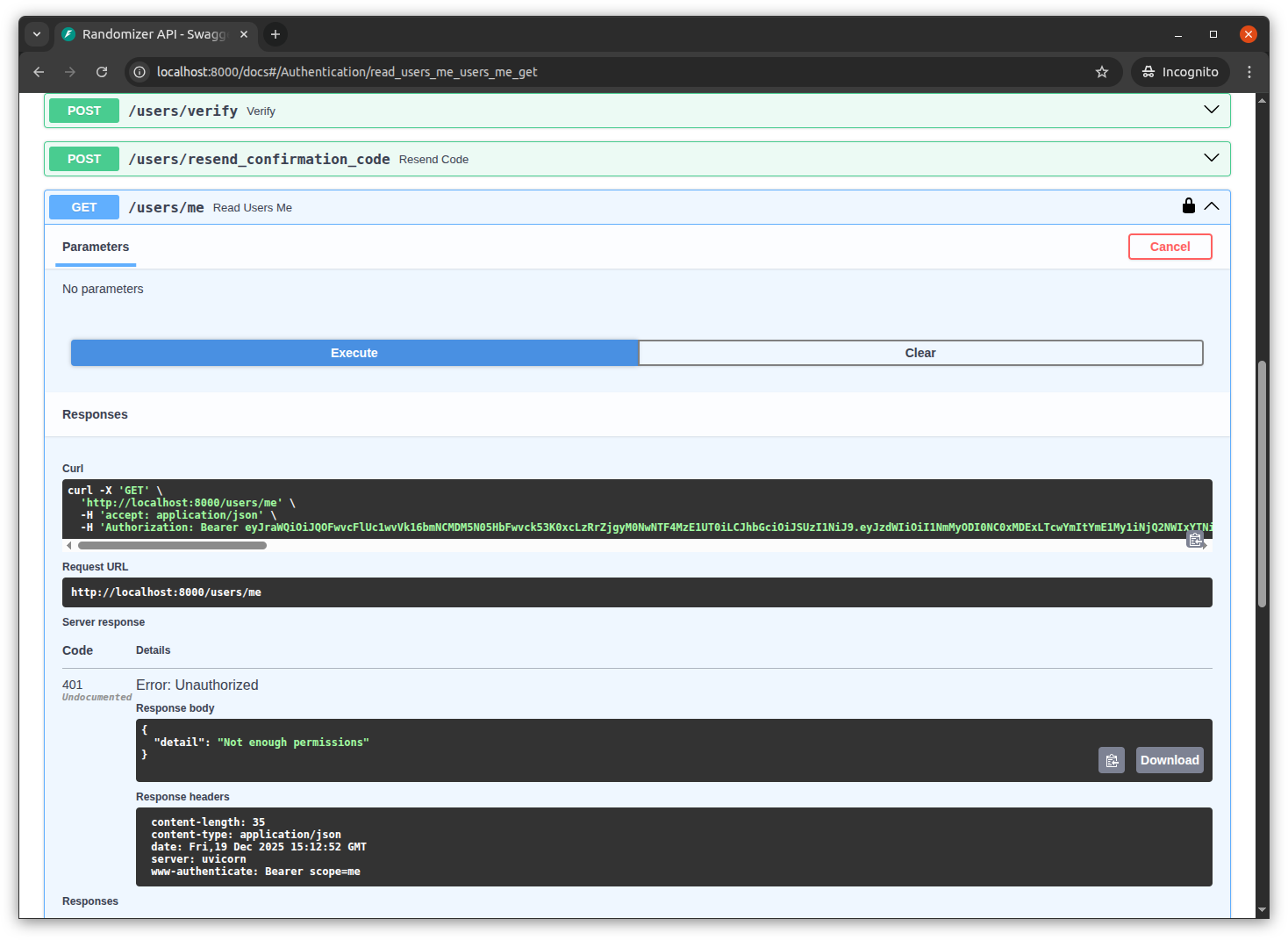
If we remove a custom scope from the Lambda, the authorization should fail for the path the scope is linked to. For example, if we remove me scope from the Lambda trigger and redeploy it, when we try to access /users/me it will fail with a 401 unauthorized error
Full source code can be viewed at the following Github Repository