When we interact with an LLM via an agent, we tend to use prompt templates with some dynamic data filled in before invoking the LLM. The issue with using static prompts is that the context within the prompt is fixed whereas in the real world, the context of each prompt should be unique and scoped to each particular agent call.
The term context engineering is used to describe a system or process of generating a unique context for each agent invocation. From the Lang-chain article on context engineering, this is defined as the output of a system that runs before the main LLM call. The context returned is dynamic, created on the fly and tailored to the immediate task at hand. More importantly, its about ensuring that the right tools and information are available to the agent at the right time. This could be in the form of historical data via a knowledge base or additional capabilities via tools and function calls to retrieve more information.
To implement context engineering, from the definition given above, we can identity the following components:
- System instructions defining the agent’s persona, capabilities and constraints
- Tool definitions in terms of schemas for APIs or functions agent can use to gather information externally
- Long term memory persisted and gathered across mulitple sessions
- Information extracted from external databases or documents using RAG
- Artifacts such as files, images associated with user or session.
- Short term memory through conversation history which is a turn-by-turn record of user/model interactions
- The user’s original query
The core idea is the dynamic construction of the context. For instance, the memory needs to be relevant and scoped to the query. In addition, the conversation history needs to be handled using other methods due to the restriction on model’s context window size.
The two main components of context engineering are Session and Memory.
Session is defined by the conversational flow or history between the user and the agent. Every interaction between the user and the agent is known as an event. Each event is stored in a pre-defined format. In the example provided, based on Gemini, we are storing the session as a list of genai.types.Content type, where each event has the following structure:
history.append(genai.types.Content(role="user", parts=[func_resp_part]))
history.append(genai.types.Content(role="model", parts=[genai.types.Part(text=response.text)]))
Each session is unique and scoped to an individual user. A user can have multiple sessions but each session will have its own conversational history. The only time this might not hold true is when we have multi-agent systems that need to share a single conversational history, but that’s outside the scope of this post.
Memory is defined as the long term storage of data or knowledge extracted from the session history. Using the memory manager mem0, we convert the history into a specific format to be persisted by the memory manager:
memory = Memory.from_config(config)

messages: list[dict] = []
for content in history:
    role = content.role
    if role == "model":
        role = "assistant"
    part = content.parts[0].text
    messages.append({"role": role, "content": part})

memory.add(messages, user_id=user_id)
We can extract the persisted memories in the process of constructing the context by adding it to the system prompt before passing it to the model for inference:
relevant_memories = memory.search(query=query, user_id=user_id)
memories_str = "\n".join(f"- {entry['memory']}" for entry in relevant_memories["results"])
memory_system_prompt = system_prompt_v2.format(memories_str=memories_str)

config = genai.types.GenerateContentConfig(
    tools=tools,
    temperature=0.0,
    system_instruction=memory_system_prompt
)

response = client.models.generate_content(
    model="gemini-2.5-flash",
    contents=history,
    config=config
)
Based on the Gemini with memory post, I re-created the given agent example to show how the various components work together as described above:
From the code above, it demonstrates some of the core components used in context engineering as discussed perviously:
- The system prompt was defined in
system_prompt_v2as a global string template. - The tool definitions are provided by the MCP server via the MCP client and an additional the built-in google maps tool from Gemini SDK.
- The long term memory is created via the OSS mem0 client using
Memory.from_config. We define some basic configurations such as the embedding and LLM models to use. - No artifacts or RAG is required for this simple example so none are defined.
- The conversation history is stored in an internal
historylist which stores each conversation turn between the user and the agent. The history is formatted and added back to long term memory. - The user query is the input passed via the CLI to the model chat loop.
The agent connects to an MCP server running on localhost with a single tool of current_temperature, which is formatted with the following Gemini tool schema:
[Tool(name='current_temperature', title=None, description='', inputSchema={'properties': {'location': {'title': 'Location', 'type': 'string'}}, 'required': ['location'], 'title': 'current_temperatureArguments', 'type': 'object'}, outputSchema={'properties': {'result': {'title': 'Result', 'type': 'string'}}, 'required': ['result'], 'title': 'current_temperatureOutput', 'type': 'object'}, icons=None, annotations=None, meta=None)]For this example, we hardcode it to return a fixed value of 25 degrees celsius but for real world usage, we would call an actual weather API. We pass in the initial user query of stating my current location and getting the current temperature. The agent responds with the hardcoded temperature from the MCP tool.
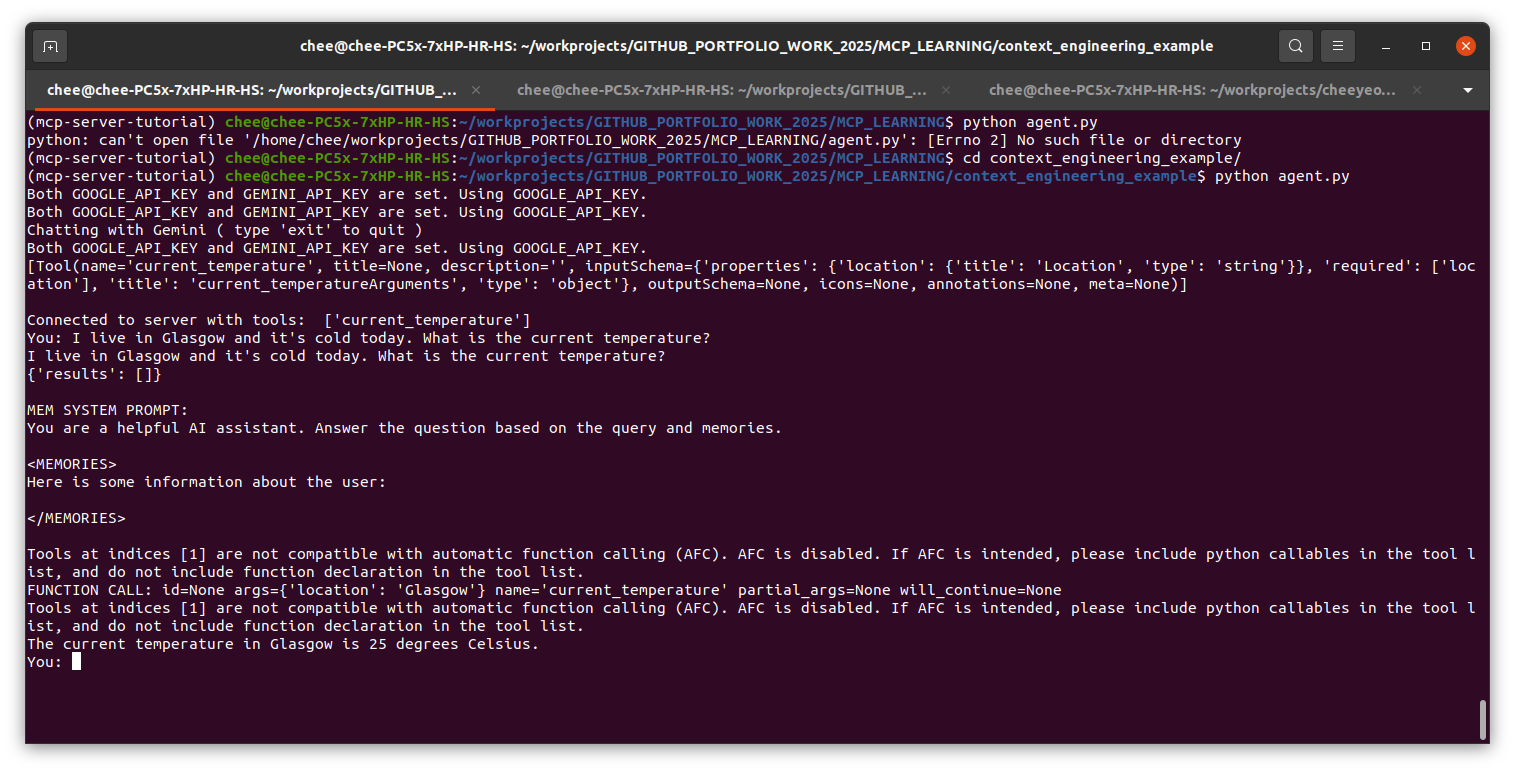
Note that the memories are still empty as this is the initial user query.
Next, we ask a follow up question on where the nearest swimming pools are based on my current location. The relevant memories were extracted and passed to the LLM. This triggers the Google Maps tool call which started to find and list swimming pools with the query 'pools in Glasgow'

This is a very simple example of what can be achieved with context engineering. Further improvements can be made for a production ready application such as:
- Persisting the conversational history in storage such as mongoDB.
- Applying truncation strategies for the conversation history to reduce the context window size and improving model’s responses. The example adds the entire history back into memory without any further compaction techniques applied.
- Moving the memory storage mechanism into an async background process.
- Moving the system prompt into an external template system.
- Use an external agent framework such as ADK to decouple the internal data structures to make the agent model agnostic.
More information and details can be accessed from the Context Engineering whitepaper.